
You’ve produced a perfect batch of plastic parts, but then you spot them: ugly black specks marring the surface. These defects can lead to high scrap rates, costly production delays, and unhappy clients. You’re left wondering where to even begin your search for the cause, feeling the pressure of deadlines mounting. A clear, systematic troubleshooting protocol is the key to quickly identifying the root of the problem and getting your production back on track.
To systematically troubleshoot black specks, follow a step-by-step protocol. Start by examining the raw material for contamination. Next, inspect the injection molding machine, focusing on the barrel, screw, and nozzle for degraded plastic residue. Then, move to the mold, checking the hot runner system for material hang-up spots. Finally, adjust processing parameters like melt temperature and residence time. This methodical approach prevents guesswork and ensures you efficiently locate and resolve the source of contamination.
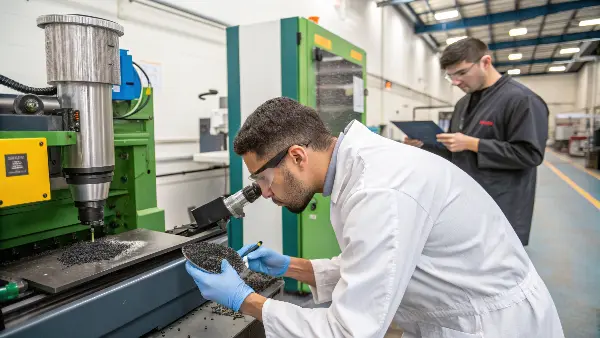
I’ve spent countless hours on the factory floor chasing down the source of these frustrating defects. In my early days, I’d jump from one potential fix to another without any real plan, which only wasted time and material. It wasn’t until I developed a structured, logical process that I started solving the problem efficiently every single time. This process turns a chaotic guessing game into a clear-cut investigation. Let’s walk through this protocol together, step by step, so you can master it too.
What Are the Root Causes of Black Specks in Molded Parts?
You see a black speck on your part, but what exactly is it? Is it burnt material, a speck of dust, or grease from the machine? Without knowing the source, your attempts to fix the issue are just shots in the dark. It’s frustrating to clean the hopper, only to find the specks are still appearing. Understanding the common culprits is the essential first step toward finding a permanent solution and preventing recurrence.
The most common root causes of black specks are material degradation, external contamination, and cross-contamination. Material degradation happens when plastic is overheated in the barrel or hot runner, creating carbonized bits. External contamination includes dust, dirt, or grease entering the system. Cross-contamination occurs when remnants of a previous, higher-temperature material break off and mix into the current production run. Identifying the type of speck is crucial for pinpointing the source.

To effectively solve the problem, you first need to play detective. The black speck itself holds clues to its origin. You need to identify what kind of contamination you’re dealing with before you can start fixing things. I always start by gathering a few sample parts and looking at the specks under a simple microscope. Are they all identical, or are there variations? Do they smear when you press them with a pin, suggesting grease or oil? Or do they shatter like carbon?
Differentiating Black Speck Types
The first thing I do is categorize the speck. Is it a hard, charcoal-like particle, or is it a discolored swirl? This initial analysis will point you in the right direction. For instance, a hard, brittle speck often points to carbonized (burnt) material, while a dark streak might indicate contamination from another polymer.
Here’s a simple table I use to quickly diagnose the issue:
| Speck Characteristic | Likely Cause | First Place to Investigate |
|---|---|---|
| Hard, Brittle, Sharp | Carbonized Plastic | Barrel, Nozzle, Hot Runner (areas of overheating) |
| Dark Smear or Streak | Grease, Oil, Hydraulic Fluid | Mold surfaces, Ejector Pins, Machine Components |
| Irregular Shape/Color | Foreign Contamination | Material Handling (Hopper, Dryer), Surrounding Environment |
| Off-Color Pellet | Cross-Contamination | Hopper, Grinder, Material Lines (remnants of old material) |
This simple breakdown helps you narrow your focus. If you find hard, brittle specks, you know you’re likely dealing with degraded material, so your investigation should focus on areas where plastic can stagnate and overheat. If you see smears, it’s time to check for leaks or over-lubrication. This diagnostic step is critical and saves you from chasing phantom problems.
Could Your Raw Material Be the Source of Black Specks?
You’ve purged the barrel and cleaned the nozzle, but the black specks keep showing up. It’s easy to immediately blame the machine or the process for contamination issues. You might spend hours disassembling parts of the machine, causing significant downtime, only to realize the problem was there before the plastic even entered the barrel. The simplest solution is often overlooked: the problem could be coming directly from your material supply.
Yes, your raw material can absolutely be the source of black specks. Contamination can happen at the supplier, during shipping, or in your own warehouse. A punctured bag can introduce dust and dirt. Regrind might contain foreign particles or degraded material from a previous run. Even virgin pellets can sometimes arrive contaminated from the manufacturer. Always start your troubleshooting by inspecting the material in the hopper and a fresh, unopened bag. This simple check can save you hours of unnecessary machine maintenance.
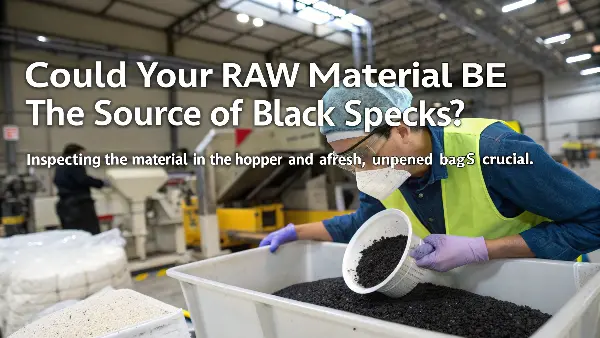
I remember one particularly frustrating case early in my career. We spent a whole day tearing down a machine to clean the screw because of persistent black specks in a polycarbonate part. We finally got it clean, reassembled everything, started the run, and the specks were back within an hour. In desperation, I finally took a handful of pellets straight from a new, sealed bag and spread them out on a clean white sheet. Sure enough, I found tiny black particles mixed in. The entire batch was contaminated from the supplier. It was a tough lesson, but now, checking the material is always my first step.
A Protocol for Material Inspection
Your material handling process is the first line of defense against contamination. A weak link here will undermine all your other efforts. I recommend a strict protocol for inspecting and handling materials.
1. Inspect Virgin Material:
Never assume virgin material is perfectly clean. Before you load a new gaylord or bag, take a sample from the top and the bottom. Spread it on a clean, well-lit surface and look for any off-color pellets or foreign debris. If you find contamination in a sealed bag, contact your supplier immediately. Don’t use it.
2. Scrutinize Regrind:
Regrind is a common source of black specks. Material that has been through the process once is more susceptible to degradation the second time. Furthermore, the grinding process itself can introduce contaminants.
- Grinder Cleanliness: Is your grinder thoroughly cleaned between materials? Remnants of a higher-temperature plastic (like PC) left in the grinder can contaminate a lower-temperature material (like PP), showing up as black specks.
- Foreign Objects: Ensure no foreign objects (bolts, labels, other plastics) are accidentally ground up with your runners and bad parts.
3. Maintain Clean Material Handling Equipment:
Hoppers, dryers, and vacuum lines are all potential hiding spots for contaminants.
- Hoppers: Do you use a cover? An open hopper is an invitation for airborne dust and debris.
- Dryers: Clean the filters regularly. Old, degraded dust can break free and enter the material flow.
- Vacuum Lines: Check for worn hoses that might shed material into the line.
By treating your material handling as a "cleanroom" process, you can eliminate the easiest and most common source of black specks before they ever reach the machine.
How Can You Identify and Clean Contamination in the Barrel and Nozzle?
You’ve confirmed your material is clean, but black specks persist. This points the finger directly at the machine itself. Over time, plastic can degrade and build up in "dead spots" within the barrel, screw, and nozzle. These hardened, carbonized bits can then break off randomly and get injected into your parts, causing defects. The problem is, you can’t see inside the barrel, leaving you to guess where the buildup might be.
To identify and clean contamination, start by purging the barrel with a suitable commercial purging compound. Examine the purge pile for chunks of carbon or dark streaks, which confirm internal buildup. If purging doesn’t solve it, you must perform a manual cleaning. This involves removing the screw from the barrel and physically scrubbing both the screw and the barrel wall with a wire brush and appropriate tools. Pay special attention to the screw flights, check ring, and nozzle tip, as these are common hang-up areas.
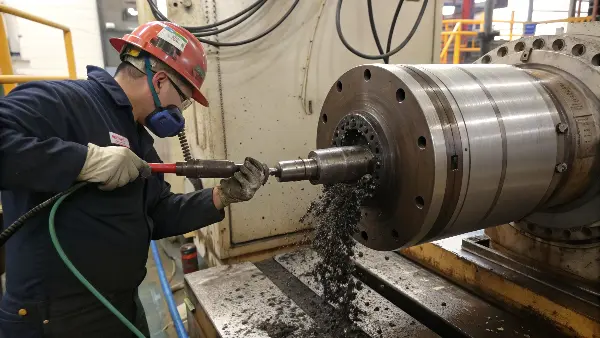
Manually cleaning a screw and barrel is a major task, so you want to be sure it’s necessary before you start. This is where purging comes in handy as a diagnostic tool. I always use a high-quality purging compound, not just regrind PP, because a good compound is designed to scrub and dissolve degraded material. As the purge comes out, lay it on a piece of cardboard. If you see big chunks of black, you know you have severe contamination that a simple purge might not fix. If you see dark streaks that slowly get lighter, it means the purge is working, and a few more cycles might solve it.
A Systematic Approach to Machine Cleaning
If purging fails, a full teardown is your only option. Don’t just pull the screw and give it a quick wipe-down. You need to be methodical.
1. Screw and Check Ring Inspection:
Once the screw is out, inspect it carefully.
- Flights: Look for caked-on, burnt material along the flights, especially in the compression and metering zones. Use a brass or copper wire brush (to avoid damaging the screw’s steel surface) to scrub these areas clean.
- Check Ring (Non-Return Valve): This is a notorious spot for material to hang up and degrade. Disassemble the check ring assembly completely. You will often find a donut of burnt material hiding behind the ring. Clean every component thoroughly before reassembly.
- Screw Wear: While the screw is out, check it for wear. A worn screw will have a larger gap between it and the barrel wall, which can reduce efficiency and create areas for material to stagnate.
2. Barrel and Nozzle Cleaning:
The screw is only half the equation. The inner wall of the barrel can also accumulate residue.
- Barrel Wall: Use a special barrel cleaning tool or a correctly sized brass brush with extension rods to scrub the inside of the barrel. Make sure the heat is still on (at a safe temperature) as this will help soften the residue.
- Nozzle: Remove the nozzle and nozzle tip. These are small components with complex internal geometries where plastic can easily get trapped. Often, you’ll find a significant amount of carbonized plastic inside the nozzle tip itself. Sometimes it’s easier and more cost-effective to just replace the nozzle tip.
This deep cleaning process is time-consuming, but it’s the only way to guarantee you’ve eliminated the machine as the source of contamination.
Is Your Hot Runner System Causing Black Specks?
You’ve certified your material is pristine and your barrel is spotless, yet those infuriating black specks are still showing up, especially after a machine pause. If this sounds familiar, it’s time to turn your attention to the mold itself, specifically the hot runner system. These systems are fantastic for efficiency, but their complex internal channels can create perfect hiding spots for plastic to stagnate, overheat, and degrade.
Yes, your hot runner system is a very common cause of black specks. Material can hang up in manifold corners, gate tips, or any area with poor flow, known as "dead spots." In these areas, the plastic sits for too long at a high temperature, eventually carbonizing. These burnt bits then break off and are injected into the part. This is often seen as a "first shot" problem after a brief stop in production, as the stagnant material has had time to degrade.

I’ve dealt with this exact issue many times, and it’s particularly tricky because the problem is hidden inside a solid block of steel. One client was getting specks in a clear medical part, but only on two cavities out of an eight-cavity mold. We checked the material and the machine—both were perfect. The culprit was a poorly designed flow path in the manifold leading to those two cavities. The plastic had to make a sharp 90-degree turn, creating a dead spot where material cooked. We had the manifold modified for a smoother radius, and the problem vanished.
Investigating and Maintaining Your Hot Runner
Troubleshooting a hot runner requires a different approach than cleaning a barrel. Disassembly is often a last resort due to the complexity and risk of damage.
1. Diagnostic Steps:
- Isolate the Problem: Are the specks in all cavities or just specific ones? If it’s isolated, it points to a problem with the flow path or gate for that specific cavity.
- Purge Through the Mold: Try purging with a commercial compound through the hot runner itself (if the compound is rated for it). This can sometimes dislodge minor buildup.
- "First Shot" Analysis: After stopping production for 15 minutes, collect the very first shot. If it’s loaded with black specks that clear up after a few cycles, you have a classic case of material degrading in the hot runner during the pause.
2. Design and Maintenance Solutions:
- Manifold Design: The ideal manifold has smooth, balanced flow paths with no sharp corners. Any "dead ends" or areas where melt flow can stagnate are prime candidates for creating carbon. If you have a recurring problem, it might be worth reviewing the manifold design with your hot runner supplier.
- Gate Tip Maintenance: The gate tips are exposed to high heat and pressure and are a common place for degradation. They are also wear items. Regularly inspect and clean the gates. Sometimes, a tiny burr or scratch inside the gate orifice is enough to trap material.
- Temperature Control: Ensure your hot runner temperature controllers are accurate. An incorrect or fluctuating temperature in one zone can lead to overheating and degradation. Use a pyrometer to verify that the set temperature matches the actual steel temperature near the flow channel.
Proper hot runner maintenance is preventative. Thoroughly cleaning the manifold and drops with a purging compound during every tool change can save you from a major teardown later.
Which Processing Parameters Can Help Eliminate Black Specks?
Your material is clean, the machine has been scrubbed spotless, and the hot runner is well-maintained, but you’re still getting occasional specks. It’s frustrating, but don’t give up. The final piece of the puzzle lies in your processing parameters. The way you melt and inject the plastic can either prevent degradation or encourage it. Tweaking your settings can often be the final step that brings your process from 99% good to 100% perfect.
Several key processing parameters can help eliminate black specks. Primarily, lower the melt temperature to the lowest possible point in the material’s recommended range to prevent overheating. Also, optimize your cycle time to reduce the plastic’s residence time in the barrel. Increasing back pressure can improve melt homogeneity but use it cautiously as it can also increase shear heat. Finally, ensure your screw rotation speed (RPM) is not excessively high, as this also generates shear-induced degradation.
I think of process optimization as fine-tuning. The big problems are fixed by cleaning and material control, but the process settings are what keep the problem from coming back. I once worked on a job with a heat-sensitive flame-retardant ABS. We kept getting specks despite everything being clean. The operator had the barrel temperatures set to the high end of the spec sheet for "better flow." As an experiment, we dropped every zone by 10°C. The specks disappeared immediately. The material was just too sensitive for that extra heat over time.
Fine-Tuning Your Process for a Speck-Free Run
Adjusting parameters should be done systematically, one at a time, so you can observe the effect of each change.
1. Melt Temperature:
This is the most critical parameter. The higher the temperature, the faster the plastic degrades.
- Action: Reduce barrel temperatures in 5-10 degree increments. Start with the nozzle and front zones, as this is where the material spends its final moments before injection. Find the "sweet spot" that provides good flow without risking thermal degradation.
2. Residence Time:
This is the total time the plastic sits inside the hot barrel. The longer it sits, the more it "cooks."
- Action: Minimize cycle time where possible. If the machine is paused for any length of time (e.g., for a robot issue), purge the barrel before restarting production to clear out any material that was sitting and degrading. For some heat-sensitive materials, using a machine with a smaller shot capacity (and thus a smaller barrel) is better to ensure the material moves through quickly.
3. Screw RPM and Back Pressure:
These parameters affect the shear heat generated during plasticizing.
- Back Pressure: A little back pressure helps create a uniform melt, but too much adds significant shear heat. Start low (around 50-100 psi) and only increase if you have melt uniformity issues.
- Screw RPM: A very high screw speed also introduces a lot of shear friction and heat. Try to set the RPM so that the screw finishes recovering just before the mold opens. This is the most efficient use of time and minimizes excess shear.
Here is a summary of process adjustments:
| Parameter | The Problem | The Solution |
|---|---|---|
| Melt Temp | Too high, causing thermal degradation. | Lower temperatures to the low end of the recommended processing range. |
| Residence Time | Plastic sits in the barrel too long and "cooks." | Minimize cycle time; purge the barrel after any production pauses. |
| Back Pressure | Too high, generating excessive shear heat. | Use minimal back pressure necessary for a homogeneous melt. |
| Screw RPM | Too high, creating excess friction and shear heat. | Set RPM to complete recovery just before the mold opens. |
By carefully balancing these four parameters, you create a process window that is not only robust but also gentle on the material, preventing the formation of black specks at their source.
Conclusion
Black specks are a common but solvable problem in injection molding. By abandoning guesswork and adopting a systematic protocol, you can reliably find and fix the issue. Start with the material, move to the machine, inspect the mold, and finally, fine-tune your process. This methodical approach will save you time, reduce scrap, and give you the confidence to tackle any contamination issue that comes your way.